


Never wonder what to text again
Cue reads your chats, shows where things really stand and writes the next message — in your voice. Works with any dating app or messenger.
One email when it launches. No newsletter, no spam.
You're not bad at texting. You're just guessing.
Cue takes the guessing out: it reads the chat, tells you what's going on and hands you a message worth sending.
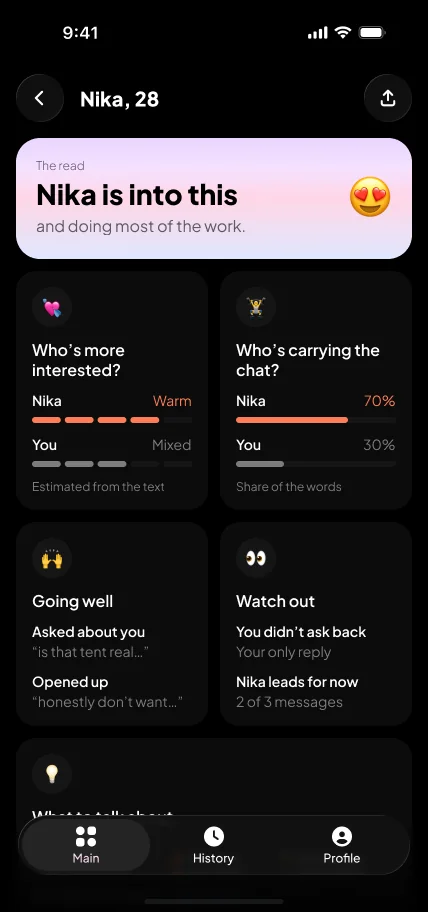
Chat breakdown
Upload a screenshot of any chat. See who's more interested, who's carrying the conversation, what's going well — and your next move.
Opening lines
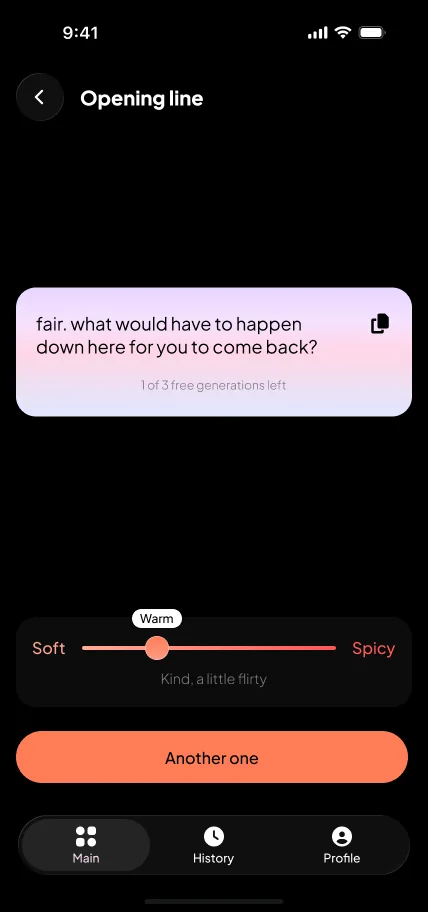
Matched and went blank? Upload their profile, type what they wrote, or just ask for one. Slide from soft to spicy.
Dating coach
They stopped replying? Want to ask them out? Tell Cue what's going on in your own words and get a straight answer.
Three steps to your next message
Tell Cue about you
What you're looking for, what's hardest for you — and swipe a few sample texts so Cue learns how you write.
Share a chat
Pick screenshots from Photos — any dating app or messenger works. With Plus, import a whole chat from WhatsApp or Telegram.
Copy, paste, send
Read the breakdown, get the next message, tweak the tone. Cue never messages anyone for you.
Know where you stand
One screenshot is enough for a clear read of the chat — the kind of honest second opinion a good friend would give you.
- Who's more interested and who's carrying the chat — estimated from the messages themselves.
- Going well, watch out — what's working, and what you're missing (like never asking back).
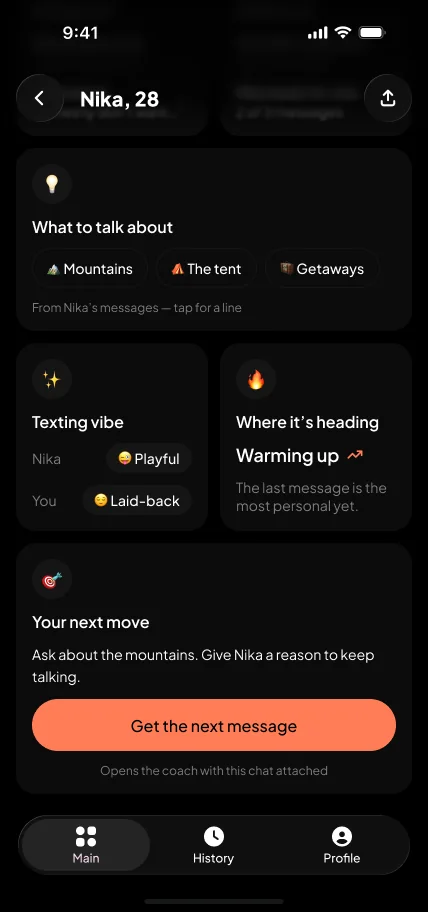
- What to talk about — topics pulled from their messages; tap one for a line.
- Your next move — one clear suggestion, then the message to send.
Lines that sound like you
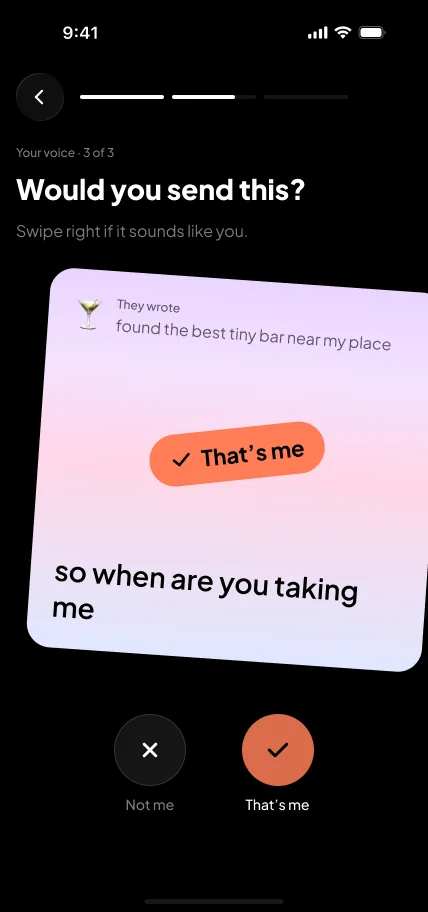
A great line that doesn't sound like you still feels off. So Cue learns how you text — lowercase or not, emoji or not, direct or playful.
- Swipe to teach it — “That's me” or “Not me” on a few sample texts during setup.
- See the difference — write a reply yourself, then compare it with the Cue version.
- Sharper over time — with Plus, Cue keeps learning from every chat you analyze.
Matched and went blank?
Get a first message that's about them, not a pickup line from the internet.
- Upload their bio — a screenshot of their profile is all Cue needs.
- Type it out — their name, age and what they wrote.
- Just give me one — no details needed.
- Soft to spicy — slide to set the tone, tap “Another one”, copy the one you like.
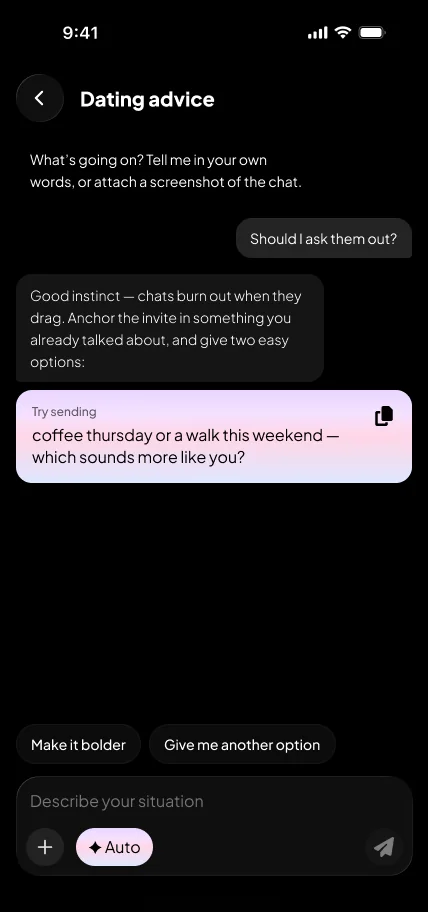
Advice for the hard moments
Describe what's going on in your own words, or attach a chat. Cue answers like a friend who's good at this — and gives you something to send.
- Start from a question — “They stopped replying”, “Should I ask them out?” and more.
- Pick a tone — Auto, Flirt, Intrigue or Connect.
- Make it yours — “Make it bolder” or “Give me another option” until it fits.
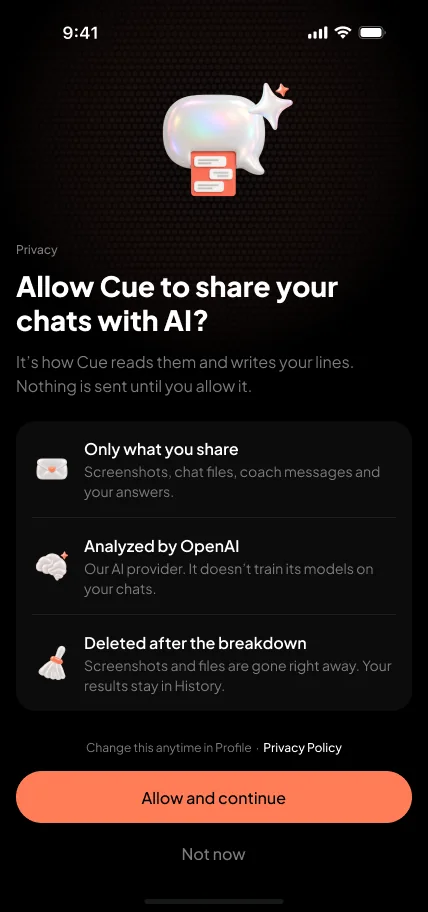
Your chats stay yours
Cue asks before anything leaves your phone, and nothing is sent until you allow it.
- Only what you share — the screenshots, chat files, coach messages and answers you choose to send.
- Analyzed by OpenAI — our AI provider doesn't train its models on your chats.
- Deleted after the breakdown — screenshots and files are gone right away; your results stay in your History.
- Your switch — turn off sharing with AI in your Profile anytime, or delete your history, your voice and your answers with Delete my data.
Free to try, Plus to keep going
Try Cue
- Chat breakdowns from screenshots
- 3 coach messages a week
- 3 opening lines a week
- Your voice, learned during setup
Keep the chat going
- Unlimited coach messages and opening lines
- Whole-chat import from WhatsApp and Telegram — see how things changed
- Cue learns your voice from every chat
- The same privacy: files are deleted right after the breakdown
Yearly with a 3-day free trial, or weekly. Cancel anytime.
Final plans and prices will be shown in the app at launch.
Be first to try Cue
Leave your email and pick your phone. We'll send one email the day Cue is out.
One email when it launches. No newsletter, no spam.