Snap a problem, get the steps: learning from photo answers
Photo answers can teach or they can do your homework for you. How to use them so you actually understand the method.
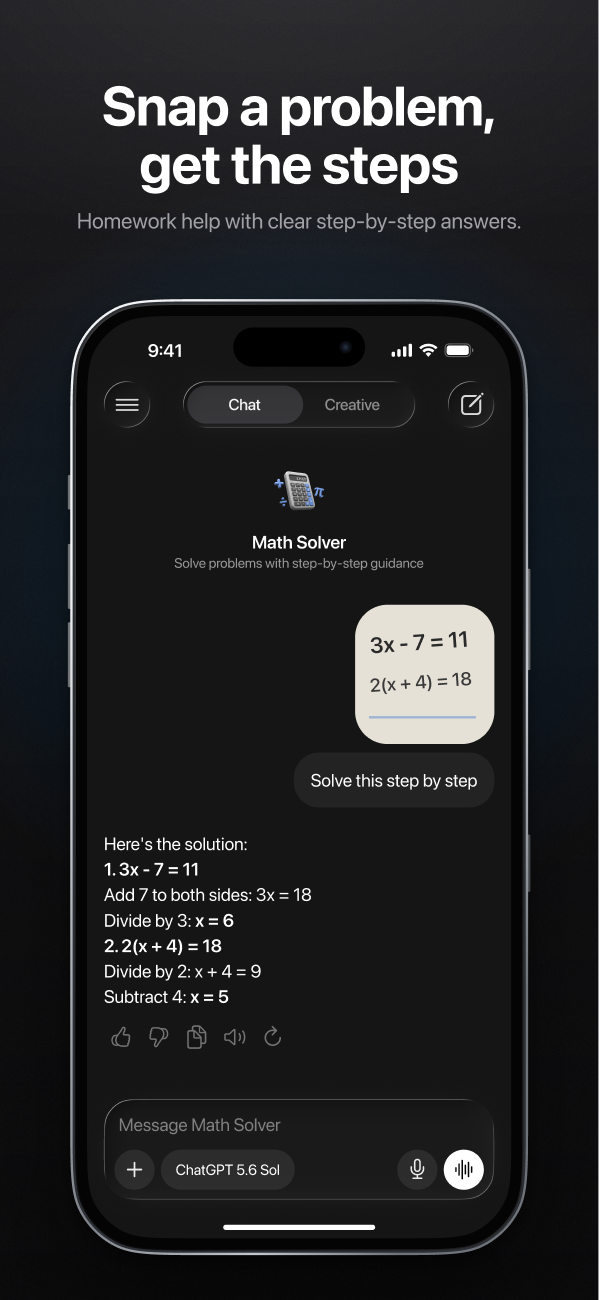
Point your phone at a maths problem, and a few seconds later you have a full worked solution. It's one of the most useful things AI can do for a student — and one of the easiest to misuse. Copy the answer and you've finished your homework but learned nothing, and the test will show it.
Used well, though, a photo answer is like a tutor who's available at 11 p.m. Here's how to use it that way.
1. Try it first
Spend a few honest minutes on the problem before you photograph it. Even a wrong attempt helps: when you then see the solution, you'll notice exactly where your thinking went off track — which is the part you actually need to learn.
2. Ask for the method, not the answer
Instead ofSolve this. TryShow me how to solve this step by step. Explain why each step works. Don't skip steps.Or, better still, make the AI hold back:
Tutor modeDon't give me the answer. Give me a hint for the first step, then wait for me to try.3. Ask "why" at the step you didn't get
The solution will have one line that makes you go "wait, where did that come from?" That's the line to ask about: "Why did you divide both sides by 3 here?" Keep asking until it clicks. An AI never gets tired of the same question.
4. Do a similar problem on your own
This is the step most people skip and the one that matters most:
PracticeGive me two similar problems with different numbers. Don't show the answers until I send mine.If you can solve those, you've learned the method. If not, you know exactly what to review.
5. Check the answer
AI makes maths mistakes — especially with arithmetic, unusual notation or blurry photos. Plug the answer back into the original problem when you can. If something looks off, ask it to check its work, or regenerate the answer with a different model and compare.
Know your class rules
Teachers and schools have different rules about AI. Using it to understand a method is usually fine; handing in AI-written work as your own usually isn't. When in doubt, ask your teacher — and never use it during a test.